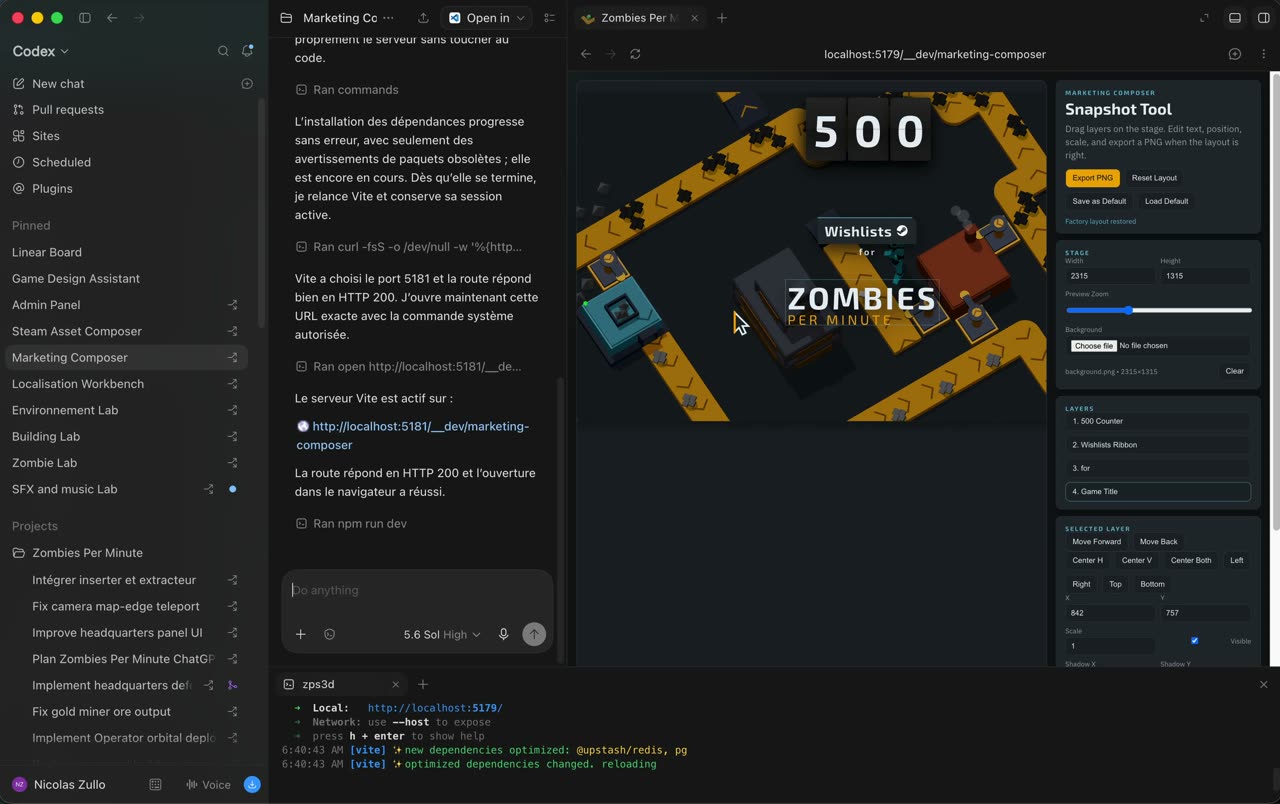
Codex has become a real game engine... If you take the time to make it become one.
You can do EVERYTHING in it.
And I think I've cracked the perfect custom UX?
I'd like to show you how I use it. See video below
4 steps:
- Create a custom tool you need, like one to generate new buildings that matches you game art direction
- Ask Codex to open this tool in a worktree (important)
- Attach the browser view of your tool in the Thread
- Use pinned thread to have easy access to the tool
And there you go: you have what I call a "codex-augmented" tool, which it's incredibly powerful because
- the tool will speed up your development immensely
AND also:
- you can improve the tool as you use it with codex
For example, let's say I want to add a new button to my 3D building gen tool so I can generate a thumbnail of the 3D building.
- I click on "Building Lab"
- I prompt Codex "add a button to generate thumbnails"
- I have my new button
- I can use the tool right away in the pinned Thread
You can then use the /yeet skill to commit, push and create a PR with the changes you made to your tool.
I have tools for everything
- To manage my tasks in Linear
- To do content / social media / steam marketing
- To localize the game in 9 languages
- To manage sounds, musics and voice lines
- To generate and fine tune buildings
- To create and animate procedural zombies
- To tweak environnement/decor and map design
- To manage my analytics
- To simulate late game perf
I'll be honest it's incredibly powerful and easy!
Games
Nine custom Codex tools run an indie zombie game's entire pipeline
Game developer Nicolas Zullo treats Codex as the engine behind Zombies Per Minute. Each custom tool, like a 3D building generator, opens in a worktree and a pinned thread and gains new buttons by prompting; others localise the game in nine languages and animate procedural zombies.
711likes
36reposts
991saves
80Kviews
- Made with
- Codex, GPT-5.6 Sol
- Role
- Game developer
- Posted